How to Upload a Geofilter to Snapchat Wedding
This Fairy Tale Life is reader supported. When you lot purchase through links on our site, we may earn a budgetary commission. Learn more.
This mail service contains affiliate links.

Are you on Snapchat? The social media platform that was one time exclusively pop amid teens is now growing exponentially with young adults. I've had a Snapchat account for a while merely I just started actively using it a few months ago and I'm hooked. I dearest how easy information technology is to send "snaps" (pictures, videos, and messages) to my friends and I admit I'm addicted to the face filters.
Ane fun feature with Snapchat is the power to add a Geofilter to your snaps. A Geofilter is an image overlay that only appears at a certain GPS location/area. For example, when you're at Disneyland yous can chose from several Geofilters that are non available outside of Disneyland.
Recently Snapchat opened upwards the power for anyone to blueprint, create, and upload their own Geofilter, and it's surprisingly affordable (starting at around $5). I'm starting to encounter them pop upwardly for small-scale businesses and events – and also at weddings! Yes, the latest wedding trend is to create a custom Snapchat Geofilter for your wedding ceremony. When your guests are sharing snaps of your wedding, they tin swipe and add your personalized Geofilter to their image or video. Pretty groovy, right?
And so how do you create a Snapchat Geofilter for Your Wedding?
The first footstep is to create your pattern. Snapchat gives you very clear guidelines regarding what images they volition approve. This includes:
- No trademarked images.
- No website URLs, phone numbers, or "@" names.
- Background must be transparent.
- Image should cover just a small per centum of the screen.
- No actual pictures of people.
If y'all need some help creating a pattern, there are plenty of shops online to have 1 made!
Etsy shop DesignsByJFK has cute Snapchat Geofilters with Disney elements!

Pink House Printing offers custom Geofilters for weddings, available/bachelorette parties, and other big events.
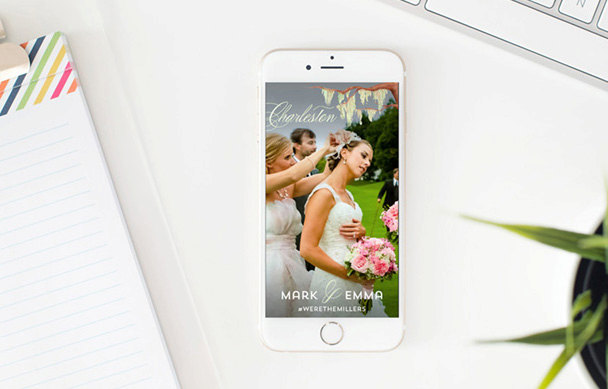
xoBespoke non only offers several dissimilar templates to cull from, merely all their templates match up with other printable products in their shop!

If you want to do something a fleck more than custom, Our Hymeneals Brand will design a Geofilter for $125. Geotag Filters also offers varying levels of custom designs, between $25 for basic text and $125 for a more custom pattern.
Once you accept your pattern, you have to submit it to Snapchat. At that place are a lot of tutorials out there on how to exercise this, and so I won't rehash it here. Check out this guide (and user experience) on Hootsuite, and this extensive tutorial from Gary Vaynerchuk. But here is just a quick rundown of what to expect.
1. Upload your design.
two. Choose your time frame. You pay by the hour, and so most couples cull to have the filter available during their wedding hours only. Even so, if you lot have some additional upkeep to spend, you could take it exist available your entire wedding weekend. Keep time zones in listen. Snapchat'southward default is Eastern time so you may need to do some math if your wedding ceremony is in California.
3. Set the geographic area. This will be the location of your wedding ceremony. You can blazon in the accost on their map, then apply the tool to fatigued a "fence" around the area yous desire. Right now yous tin can merely target the US, Canada, and United Kingdom.
iv. On the terminal screen, Snapchat will estimate your costs so you tin can get back and edit if necessary. You lot enter your payment info at this time, only you'll only be charged if the filter is approved.
This is a very simplified version of how to upload a custom Snapchat Geofilter, so if you are actually going through the process, I highly recommend carefully reading one of the tutorials I linked to in a higher place.
That's it! It'south such a cool feature; as a fan of weddings and Snapchat, I hope I get the risk to utilize a custom Snapchat Geofilter at a wedding soon!
Do y'all program on making a custom Snapchat Geofilter for your wedding ceremony? Permit me know if you practice! I'd love to hear from someone who has gone through the procedure and how your guests reacted.
Source: https://thisfairytalelife.com/snapchat-geofilter-for-your-wedding/
0 Response to "How to Upload a Geofilter to Snapchat Wedding"
Post a Comment